1 功能概述FUNCTIONAL OVERVIEW
知从玄武标定上位机工具是一种基于ASAM标准的通用测量与标定协议工具,支持多通信协议(如CAN、CANFD、Eth等),专为汽车电子控制单元(ECU)的在线标定、数据采集和调试设计。其核心功能包括:
实时数据采集:支持Polling(轮询)和DAQ(数据采集)两种模式。在线参数标定:动态调整ECU参数并实时生效,支持块标定、二维数组标定。Flash编程:将标定后的参数生成hex文件,可烧录存储至ECU的Flash中,确保持久化生效。多协议兼容:支持XCP-on-CAN、XCP-on-CANFD,XCP-on-Ethernet等多种传输层,适配不同车载网络环境。
The ZC.XuanWu Calibration Tool is a general-purpose measurement and calibration protocol tool based on ASAM standards, supporting multiple communication protocols (such as CAN, CANFD, Ethernet, etc.). It is specifically designed for online calibration, data collection, and debugging of automotive electronic control units (ECUs). Its core functions include:
Real-time Data Collection: Supports both Polling (cyclic query) and DAQ (data acquisition) modes.
Online Parameter Calibration: Dynamically adjusts ECU parameters that take effect in real-time, supporting block calibration and 2D array calibration.
Flash Programming: Generates hex files from calibrated parameters, which can be programmed and stored into the ECU's Flash memory to ensure persistent effectiveness.
Multi-Protocol Compatibility: Supports transport layers such as XCP-on-CAN, XCP-on-CANFD, and XCP-on-Ethernet, adapting to different vehicle network environments.
2 应用领域APPLICATION FIELD
知从玄武标定上位机工具可应用于OEM和Tier1多种应用场景下。用户可以方便的在实验室,试验车辆以及实车上方便的进行程序标定工作。
ZC.XuanWu program refresh and diagnostic testing tools can be applied in various application scenarios for OEMs and Tier 1 suppliers. Users can conveniently perform program calibrating work in laboratories, test vehicles, and actual vehicles.
玄武上位机软件目前应用于各类电子控制器的程序标定:
ZC.XuanWu upper computer software is currently used for program calibration of various electronic controllers:
车身控制器Body Control Module (BCM)
空调控制器Air Conditioning Controller
DC/DC控制器DC/DC Converter
电子助力转向控制器Electric Power Steering Controller
发动机控制器Engine Management System (EMS)
变速箱控制器Transmission Control Module (TCM)
电池管理系统Battery Management System (BMS)
整车控制器Vehicle Control Unit (VCU)
电机控制器Motor Control Unit (MCU)
电动助力转向系统Electric Power Steering System (EPS)
防抱死制动系统Anti-lock Braking System (ABS)
电子稳定性控制程序Electronic Stability Program (ESP)
主动防撞系统Active Collision Avoidance System (ACC)
牵引力控制系统Traction Control System (TCS)
ADAS控制器Advanced Driver Assistance Systems Controller
3 配置环境CONFIGURATION ENVIRONMENT
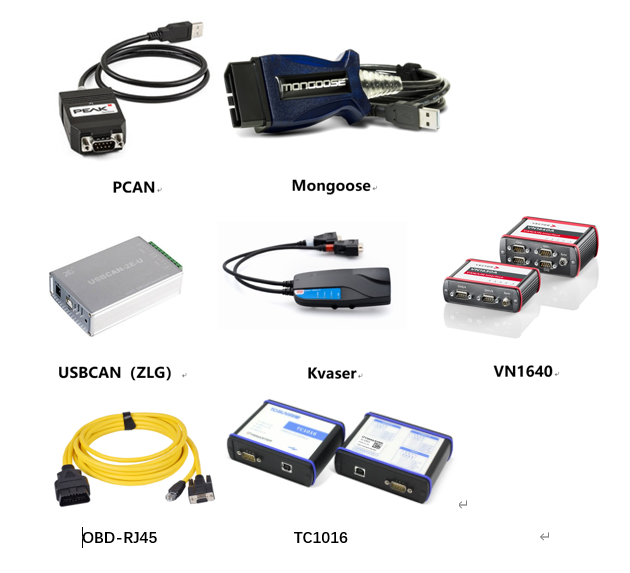
配置环境Configuration Environment | |
Hardware | PCAN、Mongoose、Kvaser、USBCAN(ZLG)、VN1640、TC1016、OBD-RJ45 |
Configuration Environment | Win7/10 64bit |
4 开发背景 DEVELOPMENT BACKGROUND
随着汽车电子化与智能化进程加速,电子控制单元(ECU)的功能复杂度呈指数级增长。21世纪初,传统汽车行业的标定逐渐暴露以下局限性:
带宽瓶颈:仅支持CAN总线,最大理论带宽1 Mbps,无法满足高频率数据采集(如电机转速、电池单体电压)需求。
协议僵化:无法适配CANFD、Ethernet等新型车载网络,制约了多域控制器(如域控、中央计算平台)的发展。
资源占用高:需在ECU中预分配固定内存块(Daq List),导致内存利用率低,尤其在小内存MCU中矛盾突出。
功能单一:缺乏动态标定、安全访问等高级功能,难以应对ISO 26262功能安全与信息安全要求。
知从玄武标定工具适配多种总线类型,支持市场主流硬件设备,支持多种类型的测量与标定,图形化界面,操作简便,满足客户需求。
With the acceleration of automotive electrification and intelligentization, the functional complexity of Electronic Control Units (ECUs) has grown exponentially. In the early 21st century, traditional automotive calibration gradually revealed the following limitations:
Bandwidth Bottleneck: Supported only CAN bus with a maximum theoretical bandwidth of 1 Mbps, failing to meet high-frequency data acquisition requirements (e.g., motor speed, battery cell voltage).
Protocol Rigidity: Incompatible with emerging in-vehicle networks like CAN FD and Ethernet, constraining the development of multi-domain controllers (e.g., domain controllers, central computing platforms).
High Resource Consumption: Required pre-allocated fixed memory blocks (DAQ List) in ECUs, resulting in low memory utilization, particularly problematic for small-memory MCUs.
Limited Functionality: Lacked advanced features such as dynamic calibration and secure access, making it difficult to comply with ISO 26262 functional safety and cybersecurity requirements.
ZC.XuanWu Calibration Tool addresses these challenges by:Multi-bus compatibility: Adapting to various bus types (CAN/CAN FD/Ethernet).Mainstream hardware support: Seamless integration with industry-standard devices.Comprehensive measurement & calibration: Supporting diverse calibration types.User-friendly GUI: Featuring intuitive graphical interfaces for simplified operations.Customized solutions: Fully meeting customer requirements across scenarios.
5 功能描述FUNCTIONAL DESCRIPTION
5.1 测量标定界面Measurement calibration View
点击右上角添加视图并选择测量标定。
Click on the top right corner to add a view and select Measurement Calibration.
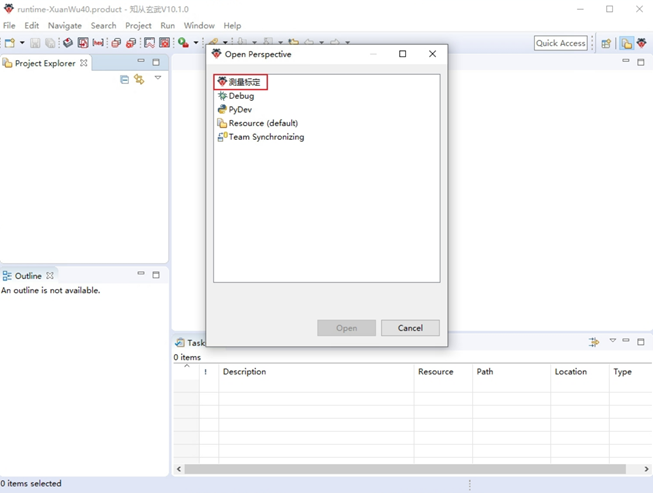
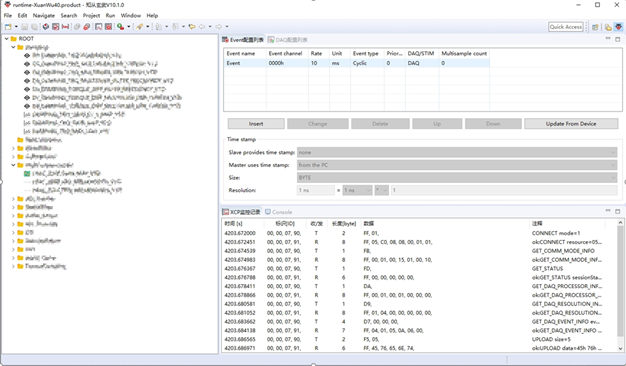
图5-1 测量标定界面 Measurement Calibration Interface
5.2 配置生成hex文件Configure the generation of hex files
点击生成hex文件按钮——>点击Insert按钮进行配置相关信息——>勾选Enable
勾选Enable是为了使能生成hex文件,如果不勾选则不会生成hex文件
Click the 'Generate hex file' button ->Click the 'Insert' button to configure relevant information ->Check 'Enable'
Checking Enable is to enable the generation of hex files. If not checked, hex files will not be generated
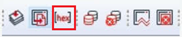
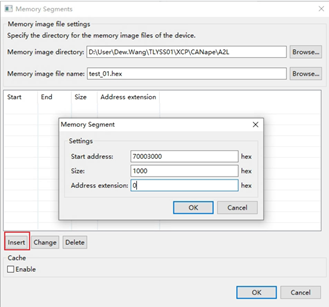
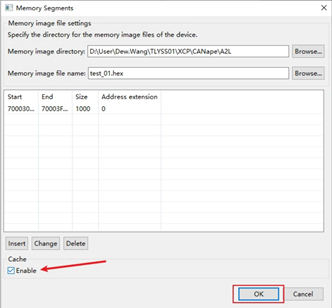
图5-2配置生成hex文件Configure the generation of hex files
5.3 连接并配置设备Connect and configure devices
连接设备,让设备通道处于开启且在线状态。
配置好之后左侧界面会显示A2L文件。
Connect the device and keep the device channel open and online.
After configuration, the left interface will display the A2L file
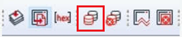
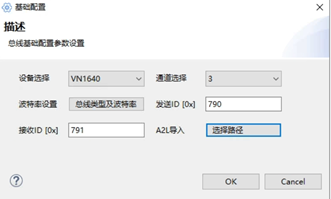
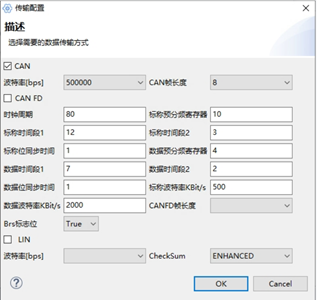
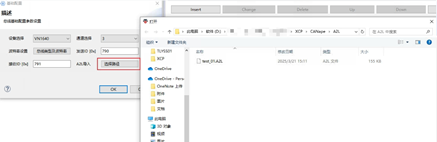
图5-3-1连接并配置Connect and configure
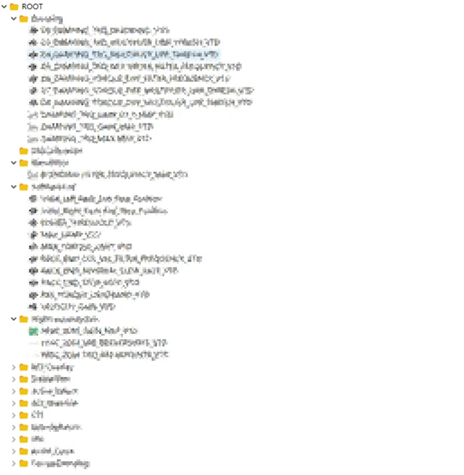
图5-3-2配置连接成功后的A2L文件界面显示
Display the A2L file interface after successful configuration connection
5.4 配置事件列表Configure event list
选择Event配置列表——>点击Update From Device按钮。
点击按钮之后会读取ECU中的事件信息并更新到界面上
Select the Event configuration list ->click the Update From Device button.
After clicking the button, the event information in the ECU will be read and updated on the interface
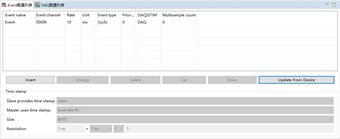
图5-4配置事件列表Configure event list
5.5 配置DAQ列表Configure DAQ List
选择DAQ配置列表——>点击Insert按钮进行配置
Select DAQ configuration list ->Click the Insert button to configure
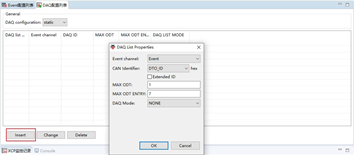
图5-5配置DAQ列表Configure DAQ List
5.6 测量measure
测量时可选择不同的测量方式(polling或者daq)
Different measurement methods (polling or daq) can be selected during measurement
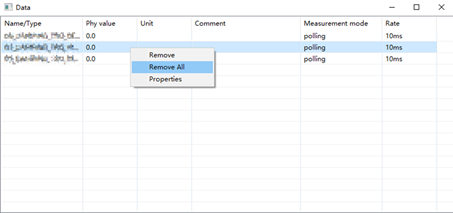
打开A2L文件——>选择所需测量的相关参数添加到测量窗口——>选择测量的方式(Polling/DAQ)——>点击开始测量按钮
Open A2L file ->Select the relevant parameters to be measured and add them to the measurement window ->Select the measurement method (Polling/DAQ) ->Click the start measurement button
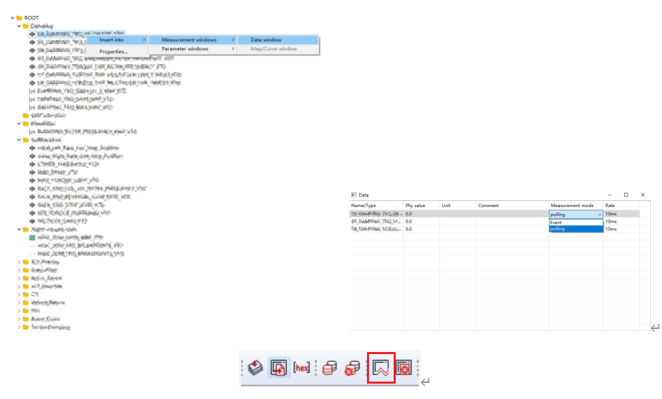
图5-6-1测量measure
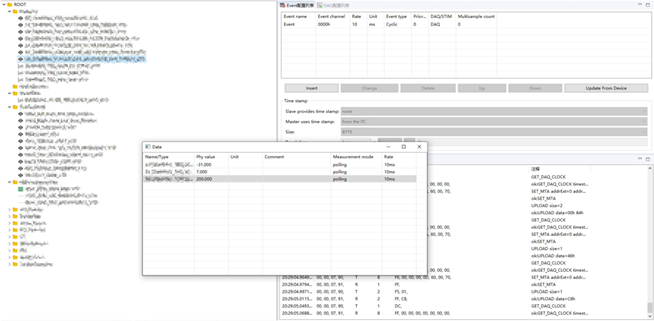
图5-6-2开始测量并成功发送接收数据界面
Start measuring and successfully sending and receiving data interface
如需停止测量可以点击停止测量按钮
To stop the measurement, click the stop measurement button
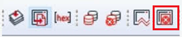
图5-6-3停止测量按钮Stop measurement button
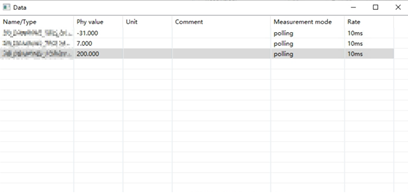
图5-6-4测量窗口measure window
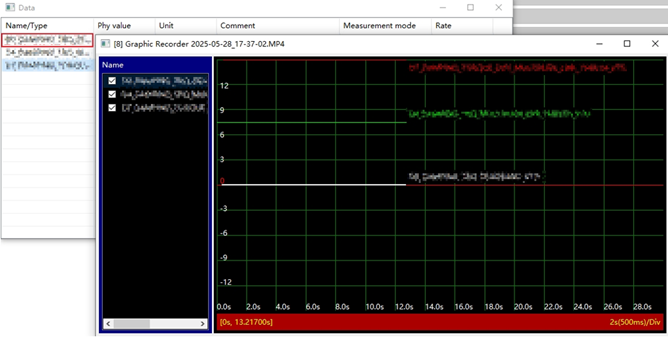
单击变量名,可以加到曲线图显示:
Click the variable name to add it to the curve display:
5.7 标定calibration
打开A2L文件——>选择所需标定的相关参数添加到标定窗口——>双击进行修改值
Open A2L file ->Select the relevant parameters to be calibrated and add them to the calibration window ->Double click to modify the values
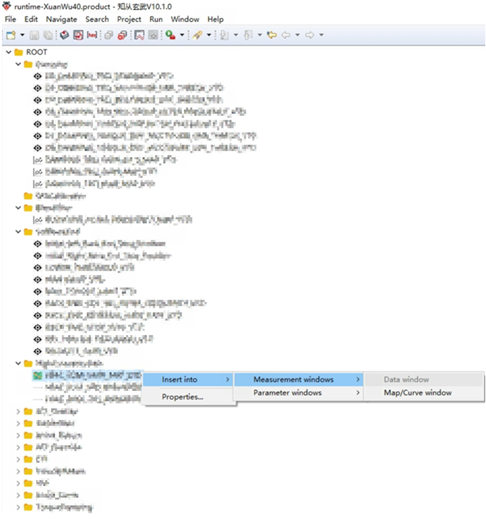
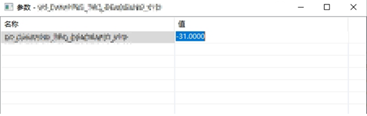
图5-7标定calibration
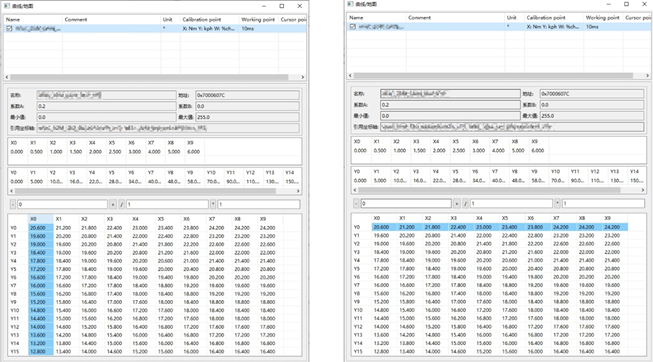
打开A2L文件——>选择所需标定的相关参数添加到标定窗口——>批量修改变量值
Open A2L file -> Select the relevant calibration parameters and add them to the calibration window -> Batch modify variable values
点击X0/Y0可以选中整列/整行:
Click X0/Y0 to select the entire column/row:
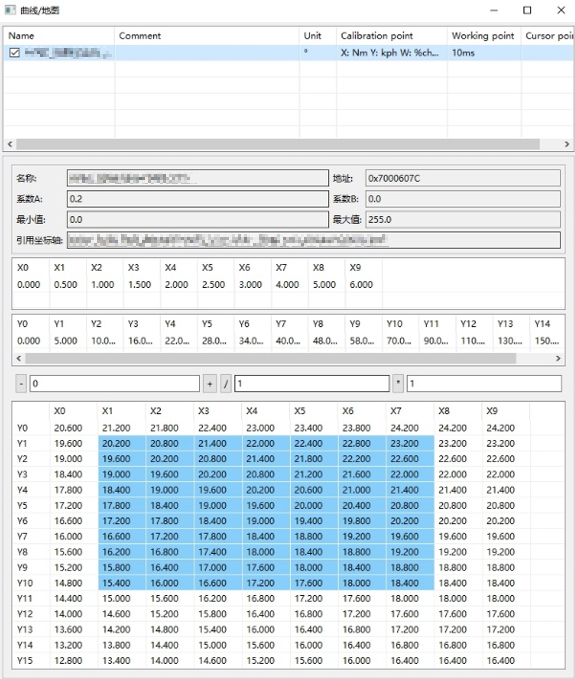
鼠标拖拽可以选中一片区域
Drag the mouse to select an area.
6 功能对比Feature comparison
支持的硬件 | ||
硬件名称 | 知从玄武 | Canape |
Vn1640/1630/5610 | √ | √ |
√ | ||
Peak PCANPT32 | √ | |
Kvaser | √ | |
ZLG USBCANFD | √ | |
TsMaster | √ | |
表6-1 硬件设备
支持的功能 | ||
功能描述 | 知从玄武 | Canape |
支持总线CAN (FD)、Ethernet、LIN, | √ | √ |
Trace窗口中的总线通信分析 | √ | √ |
记录总线数据 | √ | √ |
标定文件解析[A2L文件、ELF文件] | √ | √ |
显示DAQ列表情况 | √ | √ |
通过XCP进行在线标定 | √ | √ |
通过XCP进行在线测量 | √ | √ |
支持离线标定 | √ | √ |
标定变量曲线图展示 | √ | √ |
表6-2 支持功能
7 产品特点Product Feature
1、操作简易Easy to operate
图形化界面,方便配置
Graphical interface for convenient configuration
自动解析A2L文件
Automatically parse A2L Files
支持elf解析,和A2L文件同步地址段
Supports elf parsing and synchronizing address ranges with A2L files
2、使用灵活Flexible to Use
支持CAN、CAN FD、以太网标定
Supports CAN, CAN FD and Ethernet Calibration
支持XCP 1.1协议
Supports XCP 1.1 protocol
支持多种硬件接口
Supports various hardware interfaces
支持多种测量和标定方式
Supports a variety of measuring and Calibration specifications

 写回答
写回答


