1 方案介绍
随着汽车电子向智能化和网联化方向发展,信息安全在整车系统中的地位日益重要。ISO 21434标准的出台,以及中国《汽车整车信息安全技术要求》于2024年下半年正式推出,标志着汽车安全领域进入强监管时代。MCU端的信息安全是汽车整车信息安全体系中的重要环节,其中安全调试(Secure Debug)作为关键一环,可有效防止控制器内部安全数据被非法导出和修改。
英飞凌AURIX TC3xx系列芯片(如TC387、TC375、TC39x等)是当前汽车电子领域广泛使用的高性能MCU,其内置的硬件安全模块(HSM)和调试保护机制为安全调试提供了坚实的硬件基础。本文档基于知从科技木牛信息安全解决方案,详细介绍TC3xx系列芯片的安全调试(JTAG加密)方案及应用。
知从科技针对TC3xx系列芯片提供的安全调试方案可支持如下内容:
下线调试加密流程
诊断解密调试权限
诊断获取密钥信息
2 TC3xx调试保护架构概述
2.1 AURIX设备调试保护机制
英飞凌AURIX TC3xx系列芯片提供了多层次的调试保护机制,主要通过以下组件实现:
OCDS(On-Chip Debug Support):片上调试支持模块,提供调试接口的控制和管理功能。
DBGIF(Debug Interface):调试接口模块,支持JTAG和DAP(Device Access Port)两种调试协议。
UCB(User Configuration Block):用户配置块,用于存储调试保护的永久配置信息。
HSM(Hardware Security Module):硬件安全模块,提供密钥派生和密码学运算支持。
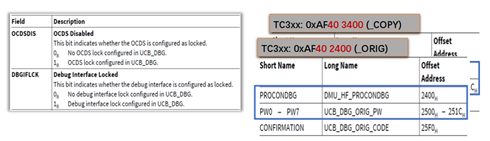
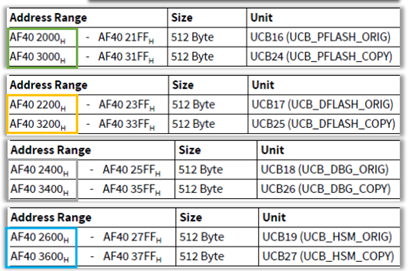
TC3xx的调试保护架构基于UCB(User Configuration Blocks)配置机制。UCB是存储在Flash中的特殊配置区域,在芯片启动时由Boot ROM读取并应用。调试保护相关的UCB配置块主要包括UCB_DBG,用于控制调试接口的锁定/解锁行为。
2.2 UCB_DBG配置块
UCB_DBG是TC3xx芯片中用于调试保护的核心配置块,其关键配置字段包括:
DBGIFLCK(Debug Interface Lock):控制调试接口的锁定状态。当DBGIFLCK=1时,调试接口被锁定,需要通过密码验证才能解锁。
OCDS_DIS(OCDS Disable):控制OCDS模块的禁用状态。当OCDS_DIS=1时,OCDS调试功能被禁用。
DBG_PASSWORD:调试密码字段,存储256位(32字节)的调试密码,用于解锁调试接口。
UCB_DBG的保护配置只能被配置一次(OTP特性),一旦锁定后,只有通过正确的调试密码才能临时解锁调试接口。这种机制确保了即使在生产环境中,授权的调试操作仍然可以在受控条件下进行。
3 安全调试方案详解
3.1 方案总体架构
知从科技针对英飞凌TC3xx系列芯片制定的安全调试方案,核心思路是通过将密钥计算接口集成到启动代码中,在ECU上电时调用密钥派生接口,通过不同的ECU Serial Number派生出不同的Derived Key并进行实时注入,以此开启Secure Debug功能。该方案主要包括以下环节:
密码派生阶段:在ECU启动时,利用ECU唯一标识信息(Serial Number + Interface ID)作为Salt,结合预置的Master Password,通过PBKDF2算法派生出每台ECU独有的Derived Key(调试密码)。
密码注入阶段:将派生出的Derived Key写入OCDS调试接口的密码寄存器,实现调试接口的自动解锁。
调试访问阶段:授权的调试工具(如Lauterbach、iSystem、IFX MemTool等)通过验证Derived Key后,获得对ECU的调试访问权限。
3.2 密码派生流程(Per-ECU Password Utility)
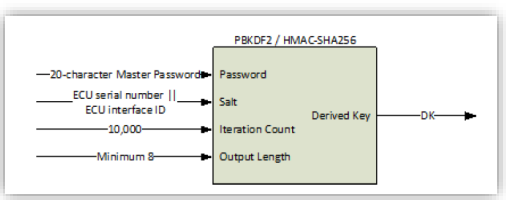
Per-ECU Password Utility是知从安全调试方案的核心工具,用于为每台ECU生成唯一的调试密码。其工作原理如下:
3.2.1 输入参数
Password(密码):20字符的Master Password,作为密码派生的主密钥。该密码由OEM或系统集成商统一管理,是整个安全调试方案的信任根。
Salt(盐值):由ECU Serial Number(16字节)和ECU Interface ID(2字节)拼接而成。ECU Serial Number是每台ECU的唯一标识,通常存储在OTP或安全存储区域中;ECU Interface ID用于区分不同的调试接口。
Iteration Count(迭代次数):10000次,PBKDF2算法的迭代轮数,决定了密码派生的计算强度。
Output Length(输出长度):大于8字节(通常为32字节/256bit),派生密钥的输出长度,与调试密码寄存器的宽度匹配。
3.2.2 密钥派生算法
密码派生采用PBKDF2(Password-Based Key Derivation Function 2)算法,具体参数如下:
哈希函数:SHA-256
迭代次数:10000
Salt:ECU Serial Number (16字节) || ECU Interface ID (2字节)
输出长度:32字节(256bit)
派生公式:Derived Key = PBKDF2(SHA-256, Password, Salt, 10000, 32)
通过使用ECU Serial Number作为Salt的一部分,确保了每台ECU的调试密码各不相同。即使Master Password泄露,攻击者也无法直接获取其他ECU的调试密码,因为每台ECU的Salt值都是唯一的。
3.2.3 Derived Key(派生密钥)
经过PBKDF2算法派生后,生成32字节(256bit)的Derived Key。该密钥具有以下特性:
唯一性:每台ECU的Derived Key不同,由ECU Serial Number保证。
确定性:对于同一台ECU,相同输入参数始终产生相同的Derived Key。
不可逆性:无法从Derived Key反推出Master Password。
密码寄存器匹配:256bit输出宽度与TC3xx UCB_DBG中的DBG_PASSWORD字段完全匹配。
Derived Key通过Character Lookup Table(字符查找表)转换后,可用于调试工具的密码输入或通过诊断服务进行传输。
3.3 调试接口锁定/解锁机制
TC3xx的调试接口锁定和解锁通过以下机制实现:
3.3.1 锁定流程
1. 在产线生产阶段,通过配置UCB_DBG将DBGIFLCK位和OCDS_DIS位设置为1。
2. 配置完成后,调试接口(JTAG/DAP)被永久锁定。
3. 此后每次ECU上电,调试接口默认处于锁定状态,无法进行任何调试操作。
3.3.2 解锁流程
1. ECU上电后,启动代码中的密钥派生接口自动执行,计算当前ECU的Derived Key。
2. 将Derived Key写入OCDS调试密码寄存器,触发密码验证。
3. 验证通过后,调试接口临时解锁,授权的调试工具可以进行调试操作。
4. ECU断电后,调试接口自动恢复锁定状态。
这种"上电自动解锁、断电自动锁定"的机制,确保了调试过程的安全性和便利性。在正常运行状态下,调试接口始终处于锁定状态;只有在授权的调试场景下,通过正确的Derived Key才能临时解锁。
3.4 Lock Debug Interface with Debug Password
当需要锁定调试接口时,需配置UCB_DBG中的以下关键字段:
OCDS_DIS = 1:禁用OCDS调试功能。
DBGIFLCK = 1:锁定调试接口。
DBG_PASSWORD:设置256位调试密码。
锁定配置完成后,调试接口将处于保护状态。此时,若需进行调试操作,必须通过以下方式之一提供正确的调试密码:
通过调试工具(如Lauterbach、iSystem)直接输入Derived Key。
通过诊断服务(UDS)传输Derived Key。
通过启动代码自动派生并注入Derived Key。
4 调试工具支持
知从安全调试方案支持多种主流调试工具,以下是各工具的使用方法:
4.1 使用IFX MemTool / PLS UDE MemTool
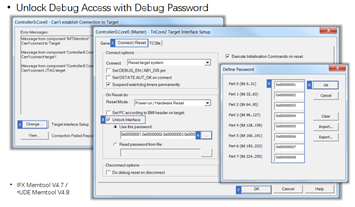
IFX MemTool和PLS UDE MemTool是英飞凌官方提供的Flash编程和调试工具。在安全调试场景下,这两个工具支持通过密码验证解锁调试接口。
Unlock Debug Access with Debug Password:在工具的调试配置界面中,输入通过Per-ECU Password Utility计算得到的Derived Key,即可解锁调试接口。
工具版本要求:IFX MemTool V4.7及以上版本,PLS UDE MemTool V4.8及以上版本。
4.2 使用Lauterbach调试器
Lauterbach TRACE32是业界广泛使用的专业调试工具。在TC3xx安全调试场景下,可通过Lauterbach Script(基于CPU设置的当前方案)实现调试接口的解锁。
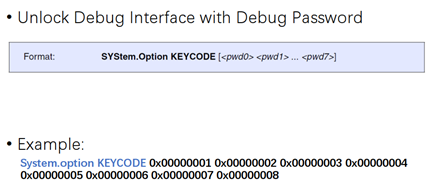
通过Lauterbach脚本命令,将Derived Key写入OCDS调试密码寄存器。
脚本支持自动读取ECU Serial Number并计算Derived Key。
解锁后可进行全功能调试,包括Flash编程、内存读写、断点调试等。
4.3 使用iSystem调试器
iSystem BlueBox调试器同样支持TC3xx的安全调试功能。在使用iSystem调试器时,需要在调试配置中提供Derived Key,调试器会在连接ECU时自动完成密码验证和接口解锁。
4.4 Lock/Unlock Debug Access Overview
以下总结了TC3xx调试接口的锁定和解锁全景:
Lock Debug Interface with Debug Password:通过配置UCB_DBG(OCDS_DIS=1, DBGIFLCK=1)永久锁定调试接口。
Unlock Debug Access with Debug Password:通过调试工具或启动代码提供Derived Key临时解锁调试接口。
Using IFX MemTool / PLS UDE MemTool:使用英飞凌MemTool或PLS UDE工具解锁。
Using Lauterbach Command:使用Lauterbach脚本命令解锁。
Using iSystem Debugger:使用iSystem调试器解锁。
5 知从木牛CryptoLibrary支持
知从科技开发的木牛CryptoLibrary为TC3xx系列芯片提供了完整的信息安全支持,包括安全调试所需的密码学运算能力。CryptoLibrary的软件架构主要分为两部分:
HSM硬件安全模块固件(zHSM CORE):运行在HSM独立处理器上的安全固件,提供AES、HASH、ECC、TRNG等NIST主流国际密码算法,以及国密算法SM2/3/4。
主核CryptoStack(CSM、CRYIF、CRYPTO、KEYM):运行在主核上的加密协议栈,通过HSM CDD(zHSM COM、zHSM CRY)与HSM内核进行通信。
在安全调试方案中,HSM模块承担了PBKDF2密钥派生的核心计算任务,确保密钥派生过程在安全环境中执行,防止密钥材料被非法读取。
6 安全调试应用场景
6.1 产线生产阶段
在产线生产阶段,安全调试方案的典型应用流程如下:
1. 产线设备为每台ECU写入唯一的ECU Serial Number。
2. 使用Per-ECU Password Utility为每台ECU计算Derived Key。
3. 将Derived Key记录到产线数据库中,与ECU Serial Number关联存储。
4. 配置UCB_DBG,设置DBGIFLCK=1和OCDS_DIS=1,锁定调试接口。
5. 如需进行产线调试,通过调试工具输入对应ECU的Derived Key解锁。
6.2 售后维修阶段
在售后维修阶段,授权的维修技师可通过以下方式获取调试访问权限:
1. 通过诊断仪读取ECU Serial Number。
2. 向OEM申请对应ECU的Derived Key(或通过授权的密钥管理系统获取)。
3. 使用Derived Key解锁调试接口,进行故障诊断和维修操作。
6.3 开发调试阶段
在开发调试阶段,开发者可通过以下方式使用安全调试功能:
1. 在开发环境中,可选择不锁定调试接口,保持传统调试方式。
2. 在集成测试阶段,启用安全调试功能,验证密码派生和解锁流程。
3. 使用Lauterbach脚本或IFX MemTool进行调试密码的自动注入和验证。
7 安全性分析
知从TC3xx安全调试方案的安全性体现在以下几个方面:
Per-ECU唯一密码:通过ECU Serial Number作为Salt,确保每台ECU的调试密码不同,防止"一钥通开"的安全风险。
PBKDF2强密钥派生:采用10000次迭代的PBKDF2算法,有效抵抗暴力破解和字典攻击。
256位密码强度:256位的调试密码提供了足够的密码空间,抵御穷举攻击。
硬件安全存储:Derived Key的派生和注入过程在HSM安全环境中执行,防止密钥材料泄露。
断电自动锁定:ECU断电后调试接口自动恢复锁定状态,避免调试接口被长时间暴露。
Master Password保护:Master Password由OEM统一管理,不直接暴露在ECU端,降低了密钥泄露风险。
8 总结
知从科技针对英飞凌AURIX TC3xx系列芯片提供的安全调试方案,通过PBKDF2密钥派生、UCB_DBG配置锁定、HSM安全计算等技术手段,实现了对JTAG/DAP调试接口的全方位保护。该方案具有Per-ECU唯一密码、硬件级安全存储、断电自动锁定等安全特性,可有效满足汽车电子信息安全的合规要求。
知从木牛CryptoLibrary为安全调试提供了完整的密码学基础设施支持,包括HSM固件、CryptoStack协议栈、密钥管理等模块,与AUTOSAR标准完全兼容。配合多种主流调试工具(Lauterbach、iSystem、IFX MemTool等)的支持,可在产线生产、售后维修、开发调试等多种场景下灵活应用。
1 Solution Introduction
With the development of automotive electronics toward intelligence and connectivity, information security has become increasingly crucial in vehicle systems. The introduction of the ISO 21434 standard and the official launch of China's "Technical Requirements for Vehicle Information Security" in the second half of 2024 mark the entry of the automotive safety sector into an era of stringent regulation. MCU-side information security is a vital component of the vehicle's information security system, with secure debugging serving as a key link to effectively prevent unauthorized export and modification of internal controller security data.
The Infineon AURIX TC3xx series chips (such as TC387, TC375, TC39x, etc.) are high-performance MCUs widely used in the automotive electronics field, with built-in hardware security modules (HSM) and debug protection mechanisms that provide a robust hardware foundation for secure debugging. This document details the security debugging (JTAG encryption) solutions and applications of the TC3xx series chips based on ZC Technology's Muniu Information Security Solution.
The security debugging solution provided by ZCTechnology for the TC3xx series chips supports the following features:
Offline debugging encryption process
Diagnostic Decryption Debugging Permissions
Diagnostic acquisition of key information
2 Overview of TC3XX Debug Protection Architecture
2.1 AURIX Device Debug Protection Mechanism
The Infineon AURIX TC3xx series chips provide multi-level debugging protection mechanisms, primarily implemented through the following components:
OCDS (On-Chip Debug Support): An on-chip debugging support module that provides control and management functions for debugging interfaces.
DBGIF (Debug Interface): Debug interface module, supporting two debugging protocols: JTAG and DAP (Device Access Port).
UCB (User Configuration Block): User Configuration Block, used to store permanent configuration information for debugging protection.
HSM (Hardware Security Module): Hardware Security Module, providing key derivation and cryptographic operation support.
The debug protection architecture of the TC3xx is based on the UCB (User Configuration Blocks) configuration mechanism. UCB is a special configuration area stored in Flash, which is read and applied by the Boot ROM during chip startup. The UCB configuration blocks related to debug protection mainly include UCB_DBG, used to control the locking/unlocking behavior of the debug interface.
2.2 UCB_DBG Configuration Block
UCB_DBG is the core configuration block for debugging protection in the TC3xx chip, with key configuration fields including:
DBGIFLCK (Debug Interface Lock): Controls the locking state of the debug interface. When DBGIFLCK=1, the debug interface is locked and requires password authentication for unlocking.
OCDS_DIS (OCDS Disable): Controls the disabled state of the OCDS module. When OCDS_DIS=1, the OCDS debugging function is disabled.
DBG_PASSWORD: Debug password field, stores a 256-bit (32-byte) debug password for unlocking the debug interface.
The protection configuration of UCB_DBG can only be configured once (OTP feature). Once locked, the debug interface can only be temporarily unlocked with the correct debug password. This mechanism ensures that even in production environments, authorized debug operations can still be performed under controlled conditions.
3 Detailed explanation of security debugging plan
3.1 Overall Architecture of the Plan
The core idea of the security debugging plan developed by ZC Technology for Infineon TC3xx series chips is to integrate the key calculation interface into the startup code, call the key derivation interface when the ECU is powered on, derive different Derived Keys through different ECU Serial Numbers, and inject them in real time to enable the Secure Debug function. The plan mainly includes the following steps:
Password derivation stage: During ECU startup, the unique identifier information (Serial Number+Interface ID) of the ECU is used as the Salt, combined with the preset Master Password, and the PBKDF2 algorithm is used to derive the Derived Key (debugging password) unique to each ECU.
Password injection stage: Write the derived Key into the password register of the OCDS debugging interface to achieve automatic unlocking of the debugging interface.
Debugging access phase: Authorized debugging tools (such as Lauterbach, iSystem, IFX MemTool, etc.) obtain debugging access to the ECU after verifying the Derived Key.
3.2 Password derivation process (Per-ECU Password Utility)
The Per-ECU Password Utility is the core tool for secure debugging solutions, used to generate unique debugging passwords for each ECU. Its working principle is as follows:
3.2.1 Input Parameters
Password: A 20 character Master Password that serves as the master key derived from the password. This password is managed by the OEM or system integrator and serves as the root of trust for the entire security debugging solution.
Salt value: composed of the ECU Serial Number (16 bytes) and ECU Interface ID (2 bytes) concatenated together. ECU Serial Number is a unique identifier for each ECU, usually stored in OTP or secure storage area; ECU Interface ID is used to distinguish different debugging interfaces.
Iteration Count: 10000 iterations, the number of iterations in PBKDF2 algorithm determines the computational strength of password derivation.
Output Length: greater than 8 bytes (usually 32 bytes/256bit), the output length of the derived key matches the width of the debug password register.
3.2.2 Key derivation algorithm
Password based Key Derivation Function 2 (PBKDF2) algorithm is used for password derivation, with the following specific parameters:
Hash function: SHA-256
Iteration times: 10000
Salt: ECU Serial Number (16 bytes) | | ECU Interface ID (2 bytes)
Output length: 32 bytes (256 bits)
Derived Key=PBKDF2 (SHA-256, Password, Salt, 10000, 32)
By using ECU Serial Number as part of Salt, it ensures that the debugging password for each ECU is unique. Even if the Master Password is leaked, attackers cannot directly obtain the debugging passwords of other ECUs because the Salt value of each ECU is unique.
3.2.3 Derivative Key
After being derived by the PBKDF2 algorithm, a 32 byte (256 bit) Derived Key is generated. This key has the following characteristics:
Uniqueness: Each ECU has a different Derived Key, guaranteed by the ECU Serial Number.
Certainty: For the same ECU, the same input parameters always generate the same Derived Key.
Irreversibility: Master Password cannot be deduced from Derived Key.
Password register matching: The 256 bit output width matches exactly with the DBG_PASSWORD field in TC3xx UCB_DBG.
Derived Key can be used for password input in debugging tools or transmitted through diagnostic services after being converted through a Character Lookup Table.
3.3 Debugging Interface Lock/Unlock Mechanism
The locking and unlocking of the TC3xx debugging interface are achieved through the following mechanisms:
3.3.1 Locking process
1. During the production stage of the production line, set the DBGIFLCK and OCDSDIS bits to 1 by configuring UCB_DBG.
2. After the configuration is completed, the debugging interface (JTAG/DAP) is permanently locked.
3. Every time the ECU is powered on thereafter, the debugging interface defaults to a locked state and cannot perform any debugging operations.
3.3.2 Unlocking process
After the ECU is powered on, the key derivation interface in the startup code automatically executes to calculate the derived key of the current ECU.
2. Write the Derived Key into the OCDS debug password register to trigger password verification.
3. After the verification is passed, the debugging interface is temporarily unlocked, and the authorized debugging tool can conduct debugging operations.
4. After the ECU is powered off, the debugging interface automatically restores the locked state.
This mechanism of "automatic unlocking when powered on and automatic locking when powered off" ensures the safety and convenience of the debugging process. Under normal operating conditions, the debugging interface is always in a locked state; Only in authorized debugging scenarios can temporary unlocking be achieved with the correct Derived Key.
3.4 Lock Debug Interface with Debug Password
When locking the debugging interface, the following key fields in UCB_DBG need to be configured:
OCDSDIS=1: Disable OCDS debugging function.
DBGIFLCK=1: Lock debugging interface.
DBG_PASSWORD: Set a 256 bit debugging password.
After the locking configuration is completed, the debugging interface will be in a protected state. At this point, if debugging operations are required, the correct debugging password must be provided through one of the following methods:
Enter Derived Key directly through debugging tools such as Lauterbach and iSystem.
Transmit Derived Key through Diagnostic Services (UDS).
Automatically derive and inject Derived Key through startup code.
4 Debugging tool support
The ZC security debugging solution supports multiple mainstream debugging tools. The following are the usage methods of each tool:
4.1 Using IFX MemTool/PLS UDE MemTool
IFX MemTool and PLS UDE MemTool are official Flash programming and debugging tools provided by Infineon. In a secure debugging scenario, these two tools support unlocking the debugging interface through password verification.
Unlock Debug Access with Debug Password: In the debugging configuration interface of the tool, enter the Derived Key calculated through the Per-ECU Password Utility to unlock the debugging interface.
Tool version requirements: IFX MemTool V4.7 and above, PLS UDE MemTool V4.8 and above.
4.2 Using Lauterbach debugger
Lauterbach TRACE32 is a widely used professional debugging tool in the industry. In the TC3xx secure debugging scenario, debugging interfaces can be unlocked through Lauterbach Script (the current solution based on CPU settings).
Write the Derived Key to the OCDS debug password register using the Lauterbach script command.
The script supports automatic reading of ECU Serial Number and calculation of Derived Key.
After unlocking, full function debugging can be performed, including Flash programming, memory read and write, breakpoint debugging, etc.
4.3 Using iSystem debugger
The iSystem BlueBox debugger also supports TC3xx's secure debugging functionality. When using the iSystem debugger, a Derived Key needs to be provided in the debugging configuration, and the debugger will automatically complete password verification and interface unlocking when connecting to the ECU.
4.4 Lock/Unlock Debug Access Overview
The following summarizes the locking and unlocking panorama of the TC3xx debugging interface:
Lock Debug Interface with Debug Password: Permanently lock the debug interface by configuring UCB_DBG (OCDS-DISI=1, DBGIFLCK=1).
Unlock Debug Access with Debug Password: Temporarily unlock the debug interface by providing a Derived Key through debugging tools or startup code.
Using IFX MemTool/PLS UDE MemTool: Unlock using Infineon MemTool or PLS UDE tool.
Using Lauterbach Command: Unlock using Lauterbach script commands.
Using iSystem debugger: Unlock using iSystem debugger.
5 Knowledge from MuNiu CRYPTOLIBRARY Support
The MuNiu CryptoLibrary developed by ZC Technology provides complete information security support for the TC3xx series chips, including cryptographic computing capabilities required for secure debugging. The software architecture of CryptoLibrary is mainly divided into two parts:
HSM Hardware Security Module Firmware (zHSM CORE): A secure firmware that runs on HSM independent processors, providing NIST mainstream international cryptographic algorithms such as AES, HASH, ECC, TRNG, as well as national cryptographic algorithms SM2/3/4.
CryptoStack (CSM, CRYIF, CRYPTO, KEYM): An encryption protocol stack that runs on the main core and communicates with the HSM core through HSM CDD (zHSM COM, zHSM CRY).
In the security debugging scheme, the HSM module undertakes the core computing task of PBKDF2 key derivation, ensuring that the key derivation process is executed in a secure environment and preventing key materials from being illegally read.
6 Security Debugging Application Scenarios
6.1 Production stage of the production line
The typical application process of safety debugging plan in the production stage of the production line is as follows:
1. The production line equipment writes a unique ECU Serial Number to each ECU.
2. Use the Per-ECU Password Utility to calculate the Derived Key for each ECU.
3. Record the Derived Key in the production line database and associate it with the ECU Serial Number for storage.
4. Configure UCB_DBG, set DBGIFLCK=1 and OCDS-DISI=1, and lock the debugging interface.
5. If production line debugging is required, unlock the corresponding ECU Derived Key by entering it through the debugging tool.
6.2 After sales maintenance stage
During the after-sales maintenance phase, authorized maintenance technicians can obtain debugging access through the following methods:
1. Read the ECU Serial Number using a diagnostic tool.
2. Apply to the OEM for the derived key corresponding to the ECU (or obtain it through an authorized key management system).
3. Use Derived Key to unlock the debugging interface for fault diagnosis and repair operations.
6.3 Development and Debugging Stage
During the development and debugging phase, developers can use secure debugging features in the following ways:
In the development environment, you can choose not to lock the debugging interface and maintain traditional debugging methods.
2. During the integration testing phase, enable the security debugging function to verify the password derivation and unlocking process.
3. Use Lauterbach scripts or IFX MemTool to debug automatic password injection and verification.
7 Security analysis
The security of the TC3xx security debugging solution is reflected in the following aspects:
Per-ECU unique password: Use ECU Serial Number as Salt to ensure that the debugging password for each ECU is different, preventing the security risk of "one key on/off".
PBKDF2 strong key derivation: Using the PBKDF2 algorithm with 10000 iterations, it effectively resists brute force cracking and dictionary attacks.
256 bit password strength: The 256 bit debug password provides sufficient password space to resist brute force attacks.
Hardware secure storage: The derivation and injection process of Derived Keys is executed in an HSM secure environment to prevent the leakage of key materials.
Power off automatic locking: After the ECU is powered off, the debugging interface automatically recovers the locked state to prevent the debugging interface from being exposed for a long time.
Master Password Protection: Master Password is managed by OEM and is not directly exposed on the ECU side, reducing the risk of key leakage.
8 Summary
ZC Technology provides a secure debugging solution for the Infineon AURIX TC3xx series chips, which achieves comprehensive protection of the JTAG/DAP debugging interface through PBKDF2 key derivation, UCB_DBG configuration locking, HSM secure computing, and other technical means. This scheme has security features such as Per-ECU unique password, hardware level secure storage, and automatic power-off locking, which can effectively meet the compliance requirements of automotive electronic information security.
ZC MuNiu CryptoLibrary provides complete cryptographic infrastructure support for secure debugging, including HSM firmware, CryptoStack protocol stack, key management, and other modules, fully compatible with AUTOSAR standards. With the support of various mainstream debugging tools (Lauterbach, iSystem, IFX MemTool, etc.), it can be flexibly applied in various scenarios such as production line, after-sales maintenance, development and debugging.
 写回答
写回答


